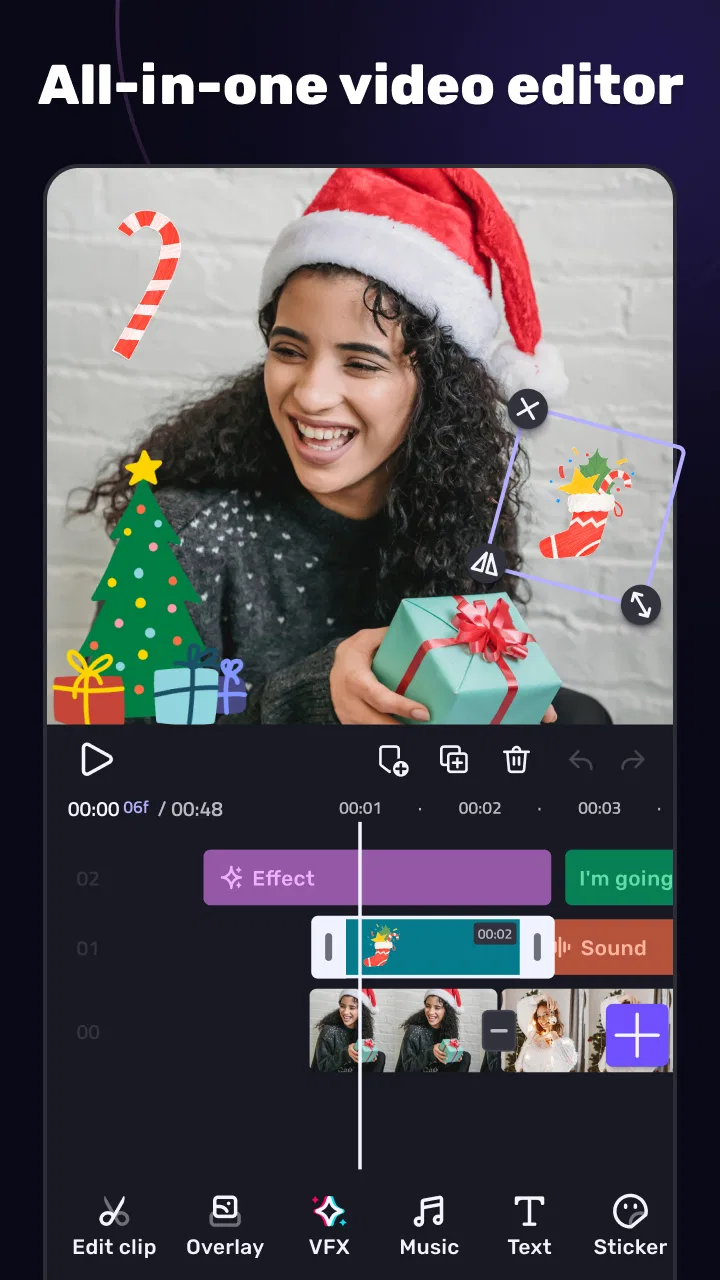
AI Video Editor - VivaCut
- 4.3
- Rating
- 100.00M
- Installs
- Free
- Price

 Analysis by App-foxy
When I try a mobile video editor, I pay attention to more than filters and transitions. I want to know whether the editing process feels understandable, whether I can control what I publish, and whether the app remains practical when a project becomes more complicated than a quick social clip. AI Video Editor - VivaCut approaches that job as a free video and photo editing app from VivaCut professional video editor. In my experience, it is aimed at people who want more creative control than a basic phone gallery editor, without immediately moving to a desktop timeline.
The app is listed in the Video Players & Editors category and has reached over 100 million installs, with an average rating of 4.3 from around 1.4 million ratings. Those figures suggest that it has become a familiar option for mobile creators, but popularity alone does not tell me whether it is a good fit for a particular workflow. What matters is how comfortably it handles everyday editing, how clearly it presents paid choices, and whether I can make decisions about my own media without feeling pushed through an opaque process.
What using VivaCut feels like in everyday editing
The strongest reason to choose VivaCut is that it tries to bridge the gap between a simple clip trimmer and a more ambitious editor. I can imagine using it for a short travel montage, a product demonstration, a birthday video, or a vertical clip assembled from several moments recorded during the day. The appeal is not just adding a decorative effect; it is having a workspace where timing, visual layers, audio, and image adjustments can be considered together.
You May Also Like

 AccuWeather: Weather Radar
AccuWeather Review: A Quick, Clear Forecast for Everyday Decisions
For everyday plans, the best forecast is the one you can understand quickly. AccuWeather makes rain timing, radar, and local conditions easy to act on, with a few trade-offs.

 Hill Climb Racing
Why Hill Climb Racing Still Turns Crashes Into One More Run
A tiny car, a bumpy hill and one more upgrade: Hill Climb Racing keeps resurfacing because its simple chaos makes every near-miss feel personal.

 AliExpress - Shopping App
AliExpress Makes Global Shopping Feel Personal, but Shoppers Bear the Risk
AliExpress turns a global marketplace into a pocket-sized discovery engine. Its reach is useful, its shopping loop compelling, and its trade-offs easy to miss.

 Lords Mobile: Kingdom Wars
Lords Mobile Is a Kingdom-Building Routine, Not a Quick Match
A case-by-case verdict on the building, battles, device demands, and social commitments that make Lords Mobile rewarding for some players and exhausting for others.

 PDF Scanner app - TapScanner
TapScanner Makes Paperwork Easier to Capture, Check, and Share
TapScanner makes scanning with a phone feel less like a rescue operation and more like a dependable step in getting work done. Its capture tools are useful, though not flawless.

 Block Blast!
 Shows How Much a Puzzle Game Can Leave Out
A quiet grid game shows why puzzle players increasingly value instant clarity, repeatable skill and low-pressure play—and where the genre still needs to catch up.
More From Our News Desk
View All News


That extra control also changes the learning curve. Someone who only wants to remove the beginning and end of a recording may find the interface more involved than the editor already built into a phone. I would not install it solely for a single cut unless I expected to keep editing. Its value becomes clearer when a project needs several clips arranged in a deliberate order, text placed at a particular moment, or a visual treatment that must stay consistent from beginning to end.
For a realistic everyday example, imagine recording a small shop’s new product on a phone. I would first gather the wide shot, close-up details, and a short spoken explanation, then build a rough sequence before worrying about effects. That order matters. If I start with transitions, I can easily spend time decorating footage that still has poor pacing. VivaCut is more useful when I treat it as an editing tool first and an effects tool second.
The app’s store summary describes it as a powerful video editor and photo editing app for quick edits and effects. I would interpret that promise carefully. It can be approachable for fast work, but the moment I use multiple creative elements, I need patience and a clear plan. Mobile editing is more constrained than desktop editing, especially when a project contains high-resolution media or several layers. A compact screen makes precise timing possible, but not always comfortable.
Where the app earns its place
I find the most convincing use case is the creator who wants to make polished short-form content directly on a phone. A casual user can begin with a small project, while a more experienced editor can use the same app to experiment with compositing, rhythm, and visual continuity. That range is more useful than a tool that looks impressive but only works for one kind of clip.
Photo editing also makes the app more flexible for a mixed project. For example, I could prepare a still image for an opening card, use it alongside moving footage, and keep the visual language consistent instead of switching between unrelated applications. This is helpful for social posts, simple announcements, and personal videos where a photograph, a title, and a video sequence belong together.
One practical tip is to decide the final destination before editing. A video intended for a phone screen has different priorities from one meant to be watched on a larger display. I would keep text large enough to read, avoid placing important details too close to the edges, and review the entire result at normal playback speed rather than judging every frame only while paused. These habits are not glamorous, but they prevent the most common mobile-editing mistakes.
Another useful approach is to save a clean version of the project before adding experimental effects. If I want to try a dramatic transition or a strong color treatment, I prefer having a stable edit to return to. That is especially important in a mobile workflow, where a quick experiment can otherwise turn into a long reconstruction. The app becomes easier to trust when my process protects the work independently of the interface.
Creative control versus convenience
VivaCut’s appeal depends on how much control I want. A basic editor is often faster for trimming one clip, correcting a small mistake, or sharing something immediately. A desktop application is usually better when I need extensive audio work, precise color management, long-form editing, or a large project with many assets. VivaCut sits between those choices: more expressive than a simple phone tool, but still shaped by the limits of a mobile device.
That middle position is useful, but it also creates trade-offs. A phone editor can make it tempting to keep adding layers, effects, and adjustments simply because they are available. The result may become visually busy or harder to revise. I get better results when I use one clear visual idea per sequence. If the footage already has movement, I may keep the transition restrained; if the footage is static, a modest motion effect can provide enough energy without overwhelming the subject.
I would also avoid assuming that an AI-related name means every part of the editing process is automatic. The practical experience still depends on my choices: selecting media, arranging it, checking timing, and deciding what should remain visible. That is a positive point for users who want authorship, but it means the app will not replace judgment. It is an assistant for making a project, not a substitute for deciding what the project should say.
Trust begins with visible choices
For me, trust in an editing app starts with the moments when it asks for access or presents an optional action. I want to see which photos and videos I am selecting, understand when a feature requires an additional step, and recognize whether an action changes the original media or creates an edited result. Clear choices reduce accidental sharing and make the workflow feel less risky.
I would therefore pay attention during setup and whenever I import media. I would review the operating system’s permission prompts rather than tapping through them automatically, and I would choose the narrowest access option that still lets me complete the task. If the phone presents a choice between selected media and a broader library, I would use the more limited option when it is sufficient. That is a general privacy habit, but it is especially relevant to an editor because personal videos and photos can be more sensitive than ordinary documents.
The app is free to install and is rated for Everyone, which makes it accessible to a broad audience. Free access can be convenient, but it also makes it important to distinguish between trying the editor and committing to optional purchases. In-app purchases are listed from $0.99 to $79.99 per item. I would check the purchase screen carefully, confirm what is being unlocked, and avoid treating a prominent upgrade prompt as a requirement before I understand the free workflow.
That price range is wide enough that I would be particularly cautious on a shared device or a family account. I would make sure the person doing the editing knows when a purchase is being proposed, and I would use the platform’s purchase authentication controls where available. This is not a criticism of a particular feature; it is simply sensible account hygiene whenever an app offers optional paid items.
Handling personal media with care
Video editing often involves material that was never intended for public viewing: children, private conversations, home interiors, travel documents visible in the background, or unfinished work. Before importing anything, I would consider whether the clip needs to be edited at all and whether a less sensitive copy would be enough. I would also review the finished video from the perspective of a stranger, looking for names, addresses, screens, or reflections that I might have overlooked while concentrating on the main subject.
I would not assume that an editing app’s creative tools automatically make a project private. My own choices still matter. I would avoid sharing a draft until I had checked the complete export, and I would keep raw footage separate from the version intended for publication. If I were working on a client project, I would use only media that I had permission to handle and would clarify who is allowed to receive the final file.
Account controls deserve the same attention as media controls. If the app offers any sign-in, purchase, or sharing decision during use, I would read each screen instead of accepting a default without looking. I would also check the phone’s app settings after installation, especially if I later stop using the editor. Removing access that is no longer necessary is a simple way to keep control of a device’s media library.
These checks may sound cautious, but they do not slow down a normal edit very much. The main habit is to pause at moments involving access, export, payment, or sharing. I prefer that approach to assuming that a familiar interface has made every decision on my behalf.
How I would organize a project before adding effects
My preferred workflow begins with selection. I would remove duplicate clips, identify the strongest opening moment, and place the essential information early. Only then would I adjust the sequence. This keeps the project manageable and makes it easier to see whether an effect is solving a real problem or merely filling empty space.
For a talking video, I would listen for pauses and repeated phrases before adding visual decoration. For a montage, I would group clips by subject or movement so that each cut feels intentional. For a photo-led story, I would decide how long each image needs to remain on screen before experimenting with motion. VivaCut is most effective when these editorial decisions lead and the effects follow.
A second tip is to check transitions at the exact point where one clip meets another. A transition that looks attractive in isolation may hide an awkward change in direction, brightness, or subject position. I would preview several seconds before and after each important cut, because the surrounding context often reveals a problem that is invisible when I inspect only the transition itself.
Audio deserves separate attention. Even a visually attractive mobile video can feel unfinished if spoken words are difficult to hear or if background sound changes abruptly. I would listen with headphones and through the phone speaker before publishing. This two-step check helps reveal both detail problems and overall loudness problems. It is one of the easiest ways to improve perceived quality without adding another effect.
Version, compatibility, and practical expectations
The current version is 4.4.5, and the listed minimum operating system is Android 7.0. That makes the app available to many older Android devices, but compatibility on paper does not guarantee an equally smooth experience on every phone. Editing performance can vary with storage space, memory, camera file size, and the number of elements in a project.
I would keep extra storage available before starting a substantial edit and avoid recording new footage while the phone is already close to full. I would also save progress in stages rather than treating one long session as the only copy of the work. If playback becomes sluggish, I would simplify the timeline before concluding that the app is unusable. A shorter sequence or fewer simultaneous elements may be a more practical solution than repeatedly forcing a demanding project through a phone.
People using older hardware should begin with a small test project. Import a few short clips, make the intended type of adjustment, and check playback and export before committing to a larger job. This is a better test than relying on the minimum operating-system requirement alone. It also gives me a chance to understand the interface and any purchase prompts without putting an important project at risk.
Who should use it, and who should choose another editor
I would recommend VivaCut to a phone-first creator who wants to move beyond basic trimming, enjoys experimenting with visual presentation, and is willing to learn a more involved editing workspace. It is also a sensible option for someone who wants video and photo work in one creative environment and prefers making short projects without opening a computer.
I would be less likely to recommend it to someone who only needs instant, uncomplicated cuts. For that person, the phone’s built-in editor or a simpler utility may be faster and less distracting. I would also look elsewhere for serious long-form production, detailed audio mixing, complex collaboration, or a workflow that depends on a large monitor and extensive file management. VivaCut can be ambitious for a mobile app, but mobile convenience is not the same as desktop depth.
Users who are highly sensitive to paid prompts should take a deliberate approach from the first session. The free installation is useful for evaluating the workflow, while the listed in-app purchase range means I would not tap through an upgrade screen without reading it. The right question is not whether every optional feature is worth buying; it is whether the free experience already suits the project and whether a paid addition solves a specific problem.
My cautious verdict
After looking at the app as both an editor and a tool that handles personal media, I see a capable middle ground rather than a universal replacement for every editing option. Its main strength is the combination of mobile convenience and creative ambition. I can use it for quick social content, but I can also approach a project with a more structured sequence, layered visuals, and a consistent presentation.
Its limitations are equally important. The richer the project becomes, the more I need to manage screen space, device performance, storage, and my own tendency to over-edit. The app will not make weak footage automatically compelling, and a beginner may need time to understand which controls genuinely improve a video. Trust also depends on my behavior: checking permissions, reading purchase choices, protecting drafts, and reviewing the final export before sharing.
With those expectations, the free app is worth trying for Android users who want a more expressive editor than the default tools provide. I would begin with a small, non-sensitive project, test the workflow on my device, and decide afterward whether its controls justify a regular place in my editing routine. That cautious start gives me the best balance of creative freedom and personal control, which is ultimately why I would recommend it to the right user rather than to everyone.
FAQs for AI Video Editor - VivaCut
01What features does VivaCut offer for video editing?
VivaCut provides a comprehensive suite of editing tools including multi-layer editing, chroma key, keyframe animations, and blending modes. It also offers advanced features such as animated text, transitions, and a variety of filters and effects, making it suitable for both beginners and professional video editors.
02Is VivaCut suitable for beginners in video editing?
Yes, VivaCut is designed to cater to users of all skill levels. Its intuitive interface and easy-to-use tools make it accessible for beginners, while advanced features are available for more experienced editors. The app also offers tutorials and guides to help new users get started.
03Does VivaCut support 4K video exports?
VivaCut supports high-definition video exports, including 4K resolution. This feature is particularly beneficial for users looking to maintain the highest quality in their video productions, whether for personal projects or professional presentations.
04Are there any subscription fees for using VivaCut?
VivaCut offers a free version with basic features, but to unlock the full range of tools and remove watermarks, users can opt for a subscription. The app provides several pricing plans, including monthly and annual subscriptions, which offer more advanced features and content.
05What platforms is VivaCut available on?
VivaCut is available for both Android and iOS devices. Users can download it from the Google Play Store for Android or the Apple App Store for iOS. The app is optimized for mobile devices, allowing for convenient editing on the go.
Pros
- Intuitive user interface for easy navigation.
- Wide range of effects and transitions.
- High-quality export options available.
- Supports multi-layer editing for videos.
- Regular updates with new features.
Cons
- Some features require in-app purchases.
- Occasional lag on older devices.
- Ads can be intrusive in free version.
- Limited stock media library.
- Export time can be lengthy for large files.

AI Video Editor - VivaCut
Gallery